
Web Publisher docs integration
This page covers integrating Web Publisher into your docs to lower the barrier for contributing to documentations.
What is Web Publisher?
Web Publisher is a page editing tool that makes docs contribution stress-free, including those of us who are not technical.
Web Publisher features a preview that live updates as you introduce your edits. Once you are ready, Web Publisher commits changes, creates a fork and a pull request for you. You don't need to have the local environment set up, clone the repository, install dependencies, or run the server to see the changes. All this is happening inside your browser.

All you need to edit the docs in Web Publisher is a StackBlitz account.
Modifying multiple files
Web Publisher allows you to edit a single page.
However, some edits require modifying a few files. In this case, you can switch to the Codeflow IDE environment, which will run the whole repository.
To do so, click on the your profile picture icon in the top right corner of the Editor panel, which will show a popup with "Open in Codeflow IDE" button:
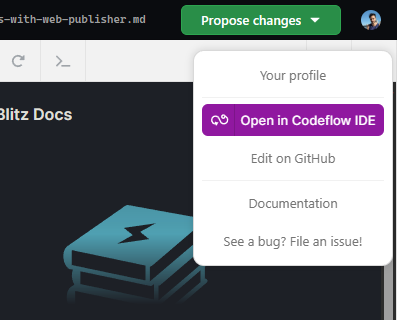
You will be redirected to the Web Studio editor and you can continue your work.
Adding Web Publisher to your docs
This section will guide you step by step through integrating Web Publisher to your docs.
1. Repository compatibility check
Before you begin, verify your toolchain works in WebContainers. To do this, add pr.new to the beginning of your docs repository GitHub URL.
Example
This is the GitHub address of the StackBlitz docs repository:
https://github.com/stackblitz/docs/
To check if this repository runs in WebContainers, we'll add pr.new to the beginning of the URL:
https://pr.new/github.com/stackblitz/docs/
If you see that the preview loads correctly (see below), this means that your dev server runs properly in WebContainers and your repository is compatible.

2. Specify the Web Publisher editing link
Let's compose a URL that will specify which file the Web Publisher should feature in the editor and which path to render in the preview. You can use the link generator below or build the link yourself.
Web Publisher link generator
Alternatively, you can use the Web Publisher link generator to compose your link:
Web Publisher links follow this pattern:
https://pr.new/github.com/{repository-owner's-username}/{repository}/edit/{branch}/{file-path-in-the-repository}
For example, here is a Web Publisher link to our docs page:
https://pr.new/github.com/stackblitz/docs/edit/main/docs/guides/user-guide/what-is-stackblitz.md
Customize the link
Now that you have the base link, you can further customize user experience with query parameters.
INFO
To specify the first parameter, add ? at the end of the base link. Connect the subsequent ones with &.
initialPath
Default behavior: the Preview window renders the homepage as not always the file path or file name is the same as the rendered route.
Argument: A route to be rendered.
Example: