

Description
Translate WordPress with GTranslate plugin uses Google Translate AI translation service to translate wordpress site with Google power and make it multilingual. With 103 available languages your site will be available to more than 99% of internet users. Our paid versions are fully SEO compatible which will increase your international traffic and sales. This translate plugin is a budget multilingual WordPress solution which combines automatic and human translations to save money and is easy to implement.
GTranslate is a leading website translation services provider since 2008, it moves away the language barriers.
Compared to other translation plugins for WordPress, we use cloud based approach which does not slow down your website. In addition to that, we can offer complete SEO features based on sub-domains with our paid options, which can make your website appear in search engines in different languages which will increase your international traffic and sales. In our paid versions we DO NOT limit the number of words or the number of translated pageviews. You DO NOT pay additionally for automatic translations.
Please use GTranslate Support for your questions and support requests! We are multilingual!
Please check our FAQ to get quick answers.
Free translation service: permitted use
Under the GTranslate Terms of Service, the free translation service is available for personal, educational, internal testing, nonprofit and governmental purposes, provided the use does not directly generate revenue from the service. Nonprofit use must further nonprofit activities; governmental use includes public institutions and other public-sector entities. Commercial or revenue-generating use requires an applicable paid subscription. This free-service restriction does not apply to free trials of paid subscriptions.
These service conditions do not change the WordPress plugin code’s GPLv2-or-later license.
Features
- Automatic machine translation
- Translate website on the fly
- Translate posts and pages
- Translate categories and tags
- Menus and widgets translation
- Themes and plugins translation
- Right to left language support
- Google Translate website translator widget alternative
- Auto-switch language based on browser defined language
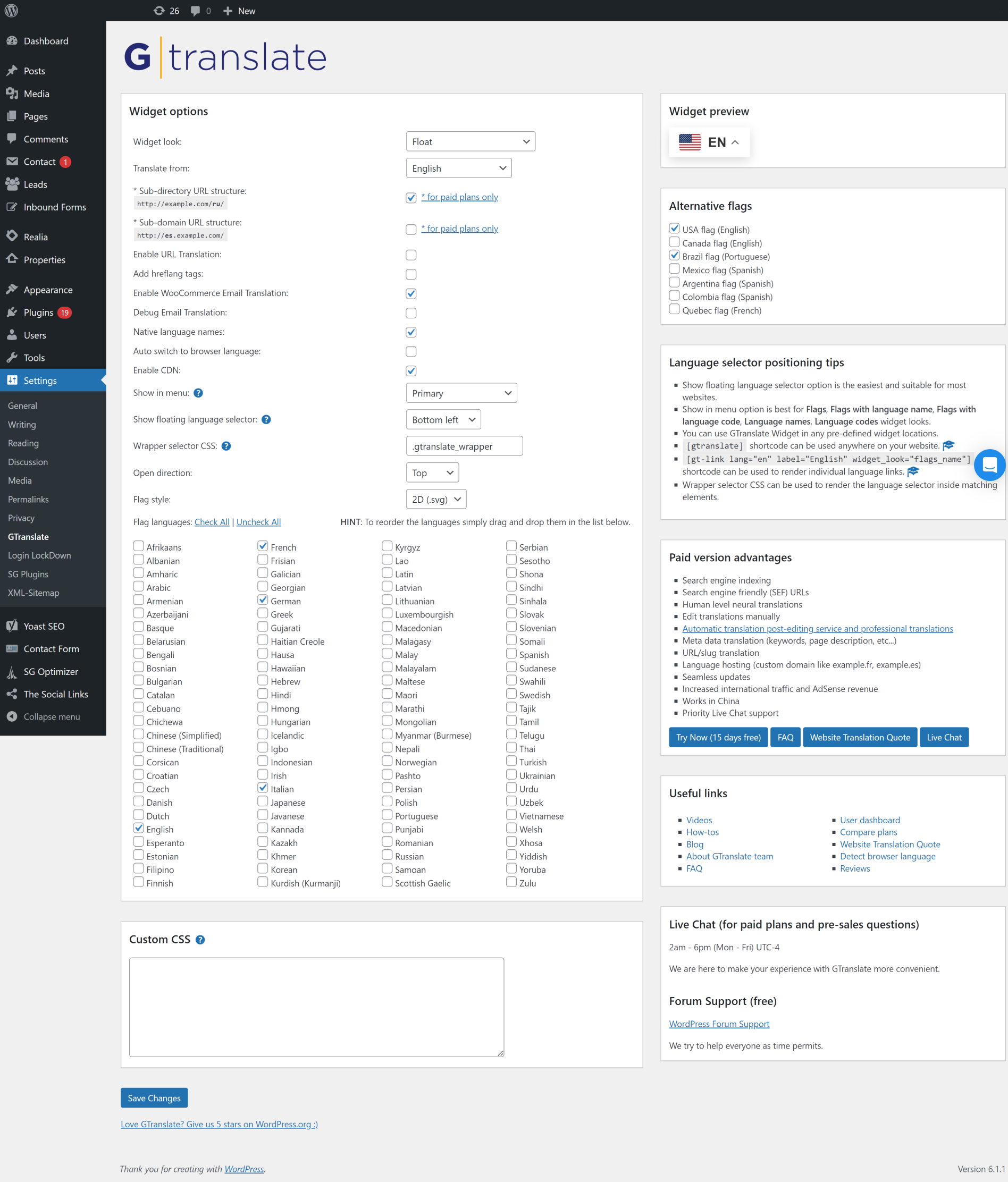
- Available styles Float, Dropdown, Flags, Flags with dropdown, Nice dropdown with flags, Flags with language names, Flags with language codes, Language names, Language codes, Globe, Popup
- Floating language selector
- WooCommerce shop translation
- Multilingual language names in native alphabet
- Alternative flags for Quebec, Canada, USA, Brazil, Mexico, Argentina, Colombia
- Lazy loading for language flags and js libraries to boost performance
- Lightweight vanilla javascript without dependencies
- Forum Support
Paid Features
- Multilingual SEO – Enable search engine indexing
- Neural machine translations with human level translation quality
- Increase traffic and AdSense revenue
- Search engine friendly (SEF) URLs
- Yoast SEO compatible – translate meta keywords, meta description, schema.org data structures, translate sitemaps
- WooCommerce compatible – translate products, schema.org data structures
- You can have sub-directory (example.com/es/) or sub-domain (es.example.com) URL structure
- URL Translation aka slug translation is possible (example.com/about-us → example.es/sobre-nosotros)
- Add hreflang tags for translated alternatives
- You can manually correct translations
- In context translation interface (make corrections without losing the context)
- Meta data translation (meta keywords, meta description)
- Translating schema.org microdata for better search engine appearance
- Seamless updates (cloud service updated on our side – SaaS, you do not need to worry about backups on your side)
- JSON format translation
- Translate WooCommerce emails
- AMP translation (Accelerated Mobile Pages translation)
- Image localization – Media translation
- Translation Proxy (aka Translation Delivery Network)
- Centralized Translation Cache – We revise and improve translations over time
- Language Hosting (example.fr)
- User Dashboard with Analytics
- Live Chat Support
See also
If you are looking for unlimited, high-quality automatic translations, check out TranslateX – an automatic translation API offering unlimited translation for your website or application.
We also offer integration plugins:
TranslateX for Loco Translate – integrate TranslateX API directly into Loco Translate for seamless, unlimited automatic translations.
TranslateX for TranslatePress – bring unlimited automatic translation to TranslatePress using TranslateX API.
These solutions make it easy to supercharge your WordPress multilingual setup with TranslateX’s secure and affordable API.
GTranslate WordPress Demo
Watch GTranslate Tour
Edit Translations Demo (paid)
External services
This plugin uses external services to load the language selector and obtain automatic translations.
GTranslate widget delivery
When the widget loads, the visitor’s browser requests its files from cdn.gtranslate.net over HTTPS. GTranslate, Inc. provides the widget, which connects the visitor’s browser to the translation service.
Google translation requests
When page translation is requested, the widget sends page text for translation from the visitor’s browser to translate-pa.googleapis.com over HTTPS. Google processes these translation requests. The content sent is the page text being translated.
Loading widget files and requesting translations are separate network operations. These requests also expose standard connection and HTTP request information, such as the visitor’s IP address and browser headers, to the receiving service. Provider processing and retention practices are described in the applicable policies; browser-based translation does not mean that no data leaves the browser or that providers retain no data.
If you configure a paid translation proxy service, translated versions of your website are processed and served through GTranslate’s cloud infrastructure according to your service configuration.
- GTranslate, Inc.: Terms of Service, Privacy Policy
- Google: Terms of Service, Privacy Policy
Review these services when updating your website’s privacy information and configuring any consent or content-security controls. The plugin requires access to the relevant external services for translation to work.
Screenshots



Blocks
This plugin provides 1 block.
- GTranslate Language Switcher
Installation
- Upload the plugin files to the
/wp-content/plugins/gtranslatedirectory, or install the plugin through the WordPress plugins screen directly. - Activate the plugin through the ‘Plugins’ screen in WordPress
- Use the Settings → GTranslate screen to configure the plugin
- There are 6 ways you can place the language selector on your website
1. Floating Language Selector You can turn on Floating language selector option from Settings → GTranslate screen and it will show the language selector in appropriate location (Top Right, Bottom Right, Top Left or Bottom Left).
2. Showing in Menu You can select from the list of available menus in which menu the language selector should appear.
3. Shortcode in Menu
You can create a new Custom Link menu item with URL = #, Link Text = English and add the following shortcode in the Description: [gt-link lang="en" label="English" widget_look="flags_name"]
Where widget_look can be one of the following: flags, flags_code, flags_name, lang_codes, lang_names
Make sure to enable “Description” under “Show advanced menu properties” in “Screen Options” dropdown on top of the screen.
4. Use GTranslate shortcode
You can use [gtranslate] shortcode anywhere on your website including posts, pages, text widgets.
You can edit your template files and use <?php echo do_shortcode('[gtranslate]'); ?> in HTML which will render the language selector.
5. Use GTranslate Widget You can use Appearence → Widgets screen to publish GTranslate widget inside a sidebar of your template.
6. Wrapper CSS Selector You can use a CSS selector and the language selector will appear inside the matching elements.
If you have any issues, please do not hesitate to use our Support Forum for free version or Live Chat for paid version.
FAQ
-
It doesn’t translate, what to do?
-
Please check GTranslate Support Forum and feel free to create a new topic if you cannot find answers.
-
What is GTranslate?
-
GTranslate can translate your website into multiple languages and make it multilingual.
- Multilingual solution makes your website available to the world
- One click translation helps visitors to read your site in their native language
- Free automatic translation translates your site instantly upon installation
- Professional translation by a human being is available
- Customizable language switcher lets you choose the suitable layout for your site
- Analytics provides insight into your audience and user activity
-
Why has the translation widget changed?
-
Version 5.0.1 replaces the legacy Google Website Translator widget with the GTranslate widget following Google’s announcement that support for its old widget ends on October 1, 2026. You can continue managing this plugin under Settings > GTranslate.
Read more Google Translate Website Widget Is Shutting Down: What to Use Instead
-
Is it FREE?
-
Yes! Use of the free translation service is subject to the permitted-use conditions in the Description. Paid subscriptions provide additional service features.
-
What is the quality of translation?
-
In our free version we use Phrase Based Machine Translations provided by Google Translate, while in our paid versions use Google Translate Neural Translations which are very accurate for popular language pairs.
In the paid versions you can refine the automatic translations yourself or order professional translations or proofreading of a translated content.
You can get a translation cost estimate by using our Website Translation Cost Calculator -
Are the translations provided free of charge?
-
Eligible use is covered by the free service described above. Otherwise, translation is provided under the applicable subscription. Review the service conditions and current plan details before choosing a service for your website.
-
Can I use it on a commercial website or WooCommerce store?
-
Commercial or revenue-generating use of the GTranslate service requires an applicable paid subscription. Technical compatibility with WooCommerce does not remove this requirement.
-
Do existing websites need to review the service conditions?
-
Yes. Review the replacement service’s terms before updating your live website. If you need clarification about your existing installation or subscription, contact GTranslate support.
-
Can I modify the translations?
-
That feature is available only in our paid version. You will be able to make edits directly on the page without losing the context.
By the way, we can help you to translate your website with a cost effective approach by post-editing your automatic translated content.
The proofreading service will be done by a native speakers and if you want to take the quality to another service, we also have a professional website translation service available.
You can get an instant website translation estimate by using our Website Word Counter tool. -
Which languages are supported?
-
Here is the list: Afrikaans, Albanian, Amharic, Arabic, Armenian, Azerbaijani, Basque, Belarusian, Bengali, Bosnian, Bulgarian, Catalan, Cebuano, Chichewa, Chinese (Simplified), Chinese (Traditional), Corsican, Croatian, Czech, Danish, Dutch, English, Esperanto, Estonian, Filipino, Finnish, French, Frisian, Galician, Georgian, German, Greek, Gujarati, Haitian Creole, Hausa, Hawaiian, Hebrew, Hindi, Hmong, Hungarian, Icelandic, Igbo, Indonesian, Irish, Italian, Japanese, Javanese, Kannada, Kazakh, Khmer, Korean, Kurdish (Kurmanji), Kyrgyz, Lao, Latin, Latvian, Lithuanian, Luxembourgish, Macedonian, Malagasy, Malay, Malayalam, Maltese, Maori, Marathi, Mongolian, Myanmar (Burmese), Nepali, Norwegian, Pashto, Persian, Polish, Portuguese, Punjabi, Romanian, Russian, Samoan, Scottish Gaelic, Serbian, Sesotho, Shona, Sindhi, Sinhala, Slovak, Slovenian, Somali, Spanish, Sundanese, Swahili, Swedish, Tajik, Tamil, Telugu, Thai, Turkish, Ukrainian, Urdu, Uzbek, Vietnamese, Welsh, Xhosa, Yiddish, Yoruba, Zulu
-
Is GTranslate SEO compatible?
-
Our free version doesn’t give any SEO advantage.
For SEO features and multilingual SEO you need to go with a paid version which have all the SEO advantages. Our paid version will translate your website and allow search engines to discover and index the translated content.
Unlike other translate plugins, we provide you all the possible tools to match with your multilingual SEO strategy.
For example you can have your translated content available via sub-directories (https://example.com/es, https://example.com/fr) or sub-domains (https://it.example.com, https://fr.example.com) or even you can host the translated versions on a top level country specific domain or any other domain like (https://example.fr, https://example.de), which will increase your chances to rank higher in local search engine’s results pages. -
What is multilingual SEO?
-
Multilingual SEO is a SEO strategy which uses new content generation technique by translating your original content and making your website multilingual. When you translate your website into many languages you actually create many new multilingual keywords targeted for international market. It helps to increase your search appearnce or impressions count on search engines results pages (SERPs), which can generate more traffic, increase sales and rise the conversion rate, because when the wording is in the correct language it is more effective.
-
Is URL Translation available?
-
In our paid versions we have a feature to translate URL of your website which will give you more SEO advantage.
For example http://example.com/about-us → http://example.com/sobre-nosotrosThis is an important part of multilingual SEO strategy. When you have URL Translate option and translate also your website URLs also known us slugs, you are creating more keywords, which count as an improvement in your page rank for that keywords.
-
Does it translate emails too?
-
Yes, with our paid version we can also translate WooCommerce emails.
-
How the free version differs from the paid versions?
-
Free vesion is a nice looking language selector you can place on your website. It has a built in Javascript engine which allows to translate your website automatically to multiple languages. With our free translate plugin your website URL doesn’t change and the translations are not stored. While paid versions are a translation proxy also known as Translation Delivery Network. We host the translated versions of your website on our cloud network under a language specific domain. In that case every language will have a separate domain or separate URL and be indexed in search engines, which will help you to increase international traffic and sales.
-
What is a Translation Delivery Network?
-
Translation Delivery Network is a translation proxy which mirrors your website in different languages.
GTranslate TDN technology is a cloud-based approach to the website translation task. There is no need to alter your environment and install software to localize your website. You can have your multilingual website up and running in less than 5 minutes.
We will translate your content and host your translations in our cloud network. All the visits to your translated versions will be proxied through our network to your original website, so you will have a translated mirror of your website.
This keeps away the need to use additional resources on your server like storage to store translations, compute time to render the translated pages or network bandwidth to deliver the translated pages to your website visitors. All is done through our network.
-
Can I exclude some parts from being translated?
-
Yes, you need to wrap the text you don’t want to be translated with <span class="notranslate"></span>.
With our paid versions you will have more control on the content which you do not want to translate. We have Skip Phrases, Skip Translations by CSS selectors and also Skip Pages features available.
You can read more about skipping translations on How to skip translations? -
Which plugins can it translate?
-
All plugins are supported including popular plugins like WooCommerce, Yoast SEO.
Our technology allows us to translate what is visible on the page, since we are parsing the end result when your website is already generated and it doesn’t matter how the content is generated and by which plugin. We can translate all HTML websites.
If you notice that something is not translated, please contact our live chat and we will be happy to solve any issues. Usually the not translated content is being loaded on your website from 3rd party sources.We also offer you to change the images and media content on the translated versions and by doing that you can also translate the texts inside images and videos.
-
How Translation Delivery Network works?
-
You just need to change your DNS records to add sub-domains or domains dedicated to your languages to our Translation Delivery Network.
So when someone visits the new added sub-domain we will show the translated clone of your website.
After that you can just configure and place the GTranslate Free widget on your site to enable language selection.
-
What are the server requirements?
-
There are no server requirements! Your website can be written in any programming language and hosted on any web server.
-
What about updates?
-
Updates are done seamlessly. Since the translations are hosted on our server we take care about updates. You just use up to date service every day. No need to worry about backups.
-
Do I need to pay for Google Translate API key usage?
-
No, we provide the automatic translations for free.
In our free version, we provide Phrase Based machine translations from Google Translate. In our paid versions, you get state-of-the-art Neural Translations. We also do not limit the number of words or translated pageviews on your website, unlike other translate plugins.
Unlike other plugins such as TranslatePress or Weglot, you do not pay additionally for automatic translations.
We also offer a cost-effective approach for improving website translations: you can request an automatic translation post-editing service (done by a native speaker), or order a professional translation. Get an instant estimate for your website at our Website Translation Quote.
If you need unlimited, fast, and affordable automatic translation, check out TranslateX – our automatic translation API that offers unlimited translation for your website or app. We also provide integration plugins for Loco Translate and TranslatePress to easily bring TranslateX’s unlimited API into other popular translation plugins.
-
Can I test before making a payment?
-
Yes, we have a 15 days free trial for our new customers.
-
How does the 15 day free trial work for your paid version?
-
Trial is available for new customers only. If you do not wish to continue you may cancel any time during the trial period and you will not be charged anything.
-
How can I be sure that search engines will index my website translations?
-
You can check that this website is indexed in Google by searching for site:gtranslate.io.
-
How I can edit the translations or order professional human translations?
-
You need to go to the language you want to edit, for instance, French: http://domain.com/fr/ and add ?language_edit=1 to the end of the URL: http://domain.com/fr/?language_edit=1 and you will see the Edit buttons near each text. Read more at How to edit translations?
If you want us to translate your website professionally or provide you a proofreading service for automatic translated content, you can get an instant estimate from Website Translation Quote, where you will get a detailed document with the list of pages, unique word count and prices to translate them.
Reviews


