We rank vendors based on rigorous testing and research, but also take into account your feedback and our commercial agreements with providers. This page contains affiliate links. Advertising Disclosure
If you don’t mind a crude UI, Smartsheet is a powerful software that’s good for managing both small and large projects. You can use it to organize a team, create stunning reports, and optimize your schedule.
However, Smartsheet can take a while to learn. And unlike most other project management software, it doesn’t have a free plan.
At a glance, Smartsheet appears to be both intimidating and designed by the most boring person you know. Like a Sudoku-inspired death trap.
But I’d be wary of any project management software that cares more about being “fun” than being efficient. So, is Smartsheet worth the learning curve? Would you be better off trying to learn something less complicated… like playing the piano?
Honestly, I know nothing of your musical inclinations, so I can’t say for sure. But as far as Smartsheet is concerned, I tested it extensively and the short answer is yes, Smartsheet is worth the time investment.
After spending an unreasonable number of days playing with charts and spreadsheets, I can say that it’s an outstanding software for managing timelines, creating reports, and organizing teams of all sizes. And though it never gets prettier, it does get a lot easier. Eventually.
Smartsheet offers a 30-day free trial and is available in English, German, Spanish, French, Italian, Portuguese, Russian, and Japanese.
But the only thing that really matters is whether Smartsheet is right for you and your project. That’s what we’re here to find out.
5.0
Features
Powerful Tools for Big Projects (and Fun Little Games)
Smartsheet has over 40 features listed on its website. And after snooping around a bit, I can say that there are many, many more available. I quickly realized that to properly test this massive project management software, I had to use it to manage a project of my own.
Enter Dungeons & Dragons (bear with me, this is relevant!), a game where a group of full-grown adults sit around a table, play make-believe, and get mad at dice. It’s also a logistical nightmare. There are charts, formulas, and flow diagrams involved in deciding which fantasy creature can cast which spell at every given moment.
Believe it or not, charting a Dungeons & Dragons campaign is actually a great way to test a project management software. And that’s exactly what I did with Smartsheet.
What I found was that Smartsheet is the complete package. It can make calculations, create sheets and reports, send automatic notifications, set custom priorities – you name it. Below are some of the features that stand out.
Visualize Your Project (in Every Way Imaginable)
If you’ve ever used Microsoft Excel or Google sheets, then you’ll recognize the grid interface. A grid is the best way to manage large amounts of information quickly. Timer in hand, it took me under 40 minutes to add over 50 items to an inventory sheet with Smartsheet’s grid view.
I know what you’re thinking: a software called Smartsheet can create spreadsheets; why is this worth mentioning? Because grids are more than just spreadsheets.
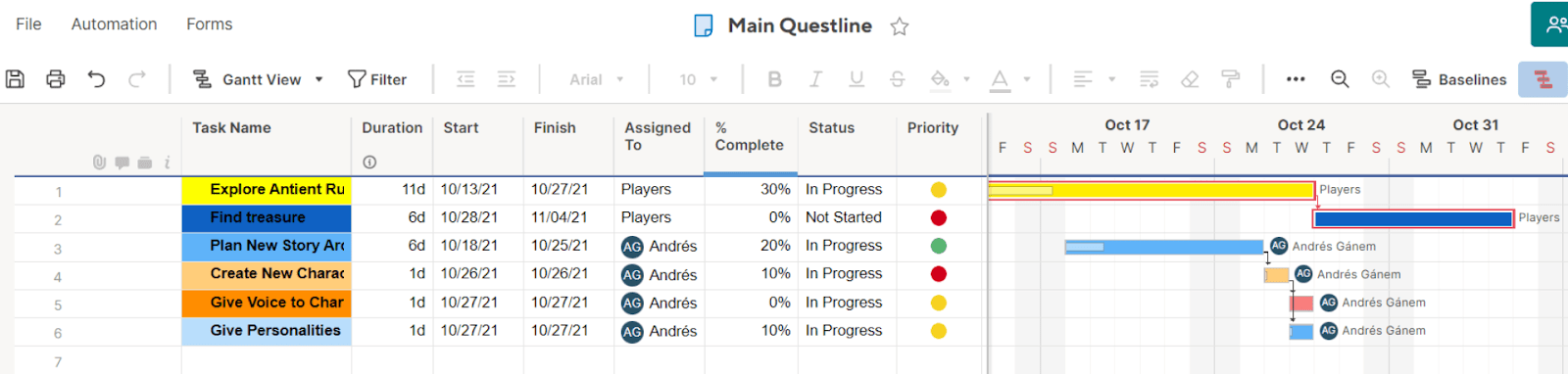
Add a couple of date columns and you can see your timeline in a Gantt chart, which is a great way to visualize your project’s goals. Do you need a simpler view of all your tasks? You can see them as cards on a board. You can also use a calendar view, which helps you stay organized.
Gantt view helped me plan for upcoming D&D sessions ahead of time.
The members of your team might have different ways to process and learn information. Being able to see the same project in different ways means everyone can perform their best.
If you need to ask for your employees’ contact info or get feedback from your customers, Smartsheet can help.
The built-in forms feature in Smartsheets lets you send out forms, collect data, and automatically input that data into columns of your choosing.
There are advanced settings too. For instance, when you design your forms, you can use conditional logic to get different questions to appear depending on previous answers. Plus, anyone can fill a form, no account necessary.
 Website Planet