We rank vendors based on rigorous testing and research, but also take into account your feedback and our commercial agreements with providers. This page contains affiliate links. Advertising Disclosure

Hostinger Website Builder Review: Does It Deliver in 2026?

Headshot of Danielle Nofuente Reviewed by: Danielle Nofuente
Headshot of Sayb Saad Written by: Sayb Saad
quotes

Much like it does with hosting, Hostinger places an emphasis on ease of use and user experience when it comes to its website builder. It may not be as jam-packed with features as some other builders, but it’s well-rounded, clean-looking, and affordable. This makes it one of the best builders for an uncomplicated experience that still offers plenty of creative freedom.

Overview

Hostinger Website Builder at a Glance

💯Free PlanNo
💲Starting Price$2.99
📄Number of Templates180
🔌Apps/IntegrationsYes
🛒E-commerce ToolsYes
Shared Reseller Dedicated Cloud WordPress

Hostinger Pros, Cons, & Things That Could Be Better

  • Easy website creation process with AI
  • Very low pricing for e-commerce plans
  • AI tools for SEO, writing blog posts
  • Decent customization with manual editing
  • Good customer support, knowledge base
  • Easy integration with Google, Meta tools
  • Few third-party integrations available
  • Having just 2 plans limits your options
  • Harder for large businesses to scale up

Hostinger Website Builder gives you the tools to create a professional site online quickly with an intuitive AI-assisted workflow – but does it succeed?

After days of in-depth testing, I’m pleased to report that it does. Hostinger’s intuitive user interface and drag-and-drop editor make it great for beginners. Coupled with AI tools like a writer, image and logo maker, SEO Assistant, and its new email marketing AI tool, it’s one of the best choices for fast, fuss-free site building.

Now, while Hostinger’s back-to-basics approach may not offer the same kind of depth you’d find in Wix or Squarespace, it’s still a viable choice for just about any kind of website. For instance, with the Business Website Builder plan, you can sell up to 1,000 products with zero transaction fees and support for 100+ payment gateways. For $3.99, that’s really hard to beat.

That said, does Hostinger offer enough features for your site, or should you consider a more advanced option? Read on to find out.

.
Hostinger-logo-horizontal

Hostinger Website Builder is now only $2.69 per month!

Get this exclusive price with our code at checkout - limited time only!

223 users used this coupon!
4.9

Templates

A Wide Variety of Modern, Good-looking Designs

Hostinger Homepage Examples
You’ll never build a cookie-cutter website with Hostinger – every template is modern and unique

One of the greatest things Hostinger Website Builder offers is template variety. There are 180 responsive templates divided into 20+ niche-specific categories, such as Health & Beauty, Photography, Entertainment, and more. You can also spin up link-in-bio websites – just pick the Link in Bio option when creating a new site, choose a template, and funnel followers to your merch, content, and offers behind a single short URL.

It’s not uncommon for a website builder to have professionally designed templates in one or two well-publicized categories, only for users to discover that the templates in less trendy niches look outdated and out of place. Fortunately, Hostinger isn’t one of them. Every category is filled with modern-looking templates that carry the right tone for their purpose.

Hostinger AI Templates
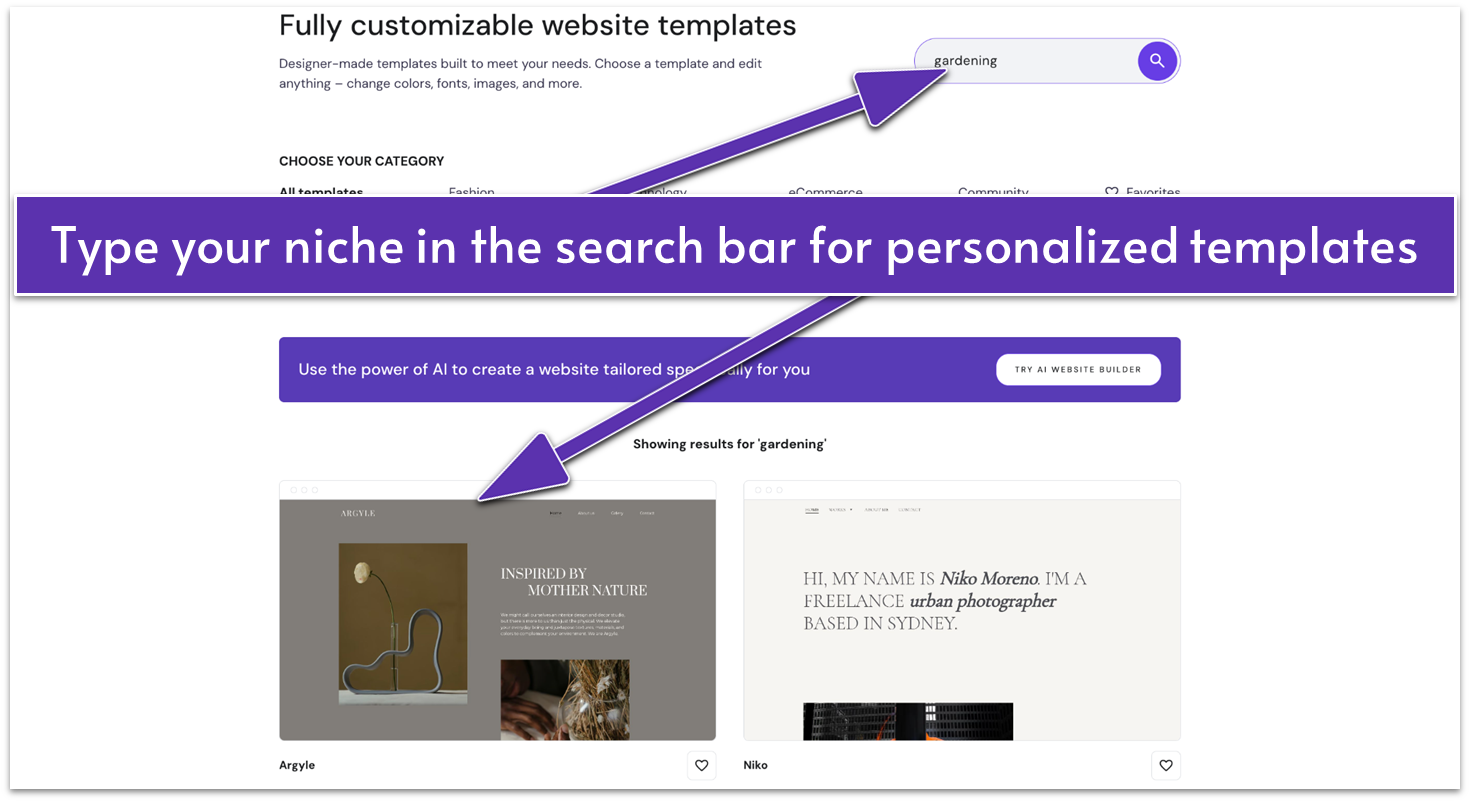
Hostinger can generate templates for virtually any niche

Besides the sizable number of professionally designed templates, you’ll have access to an infinite number of uniquely generated templates thanks to Hostinger’s AI tools. All you have to do is type your niche into the search bar, and Hostinger will generate custom templates based on your prompt.

Or, if you want an even faster way to get online, you can use Hostinger’s AI website builder. You’ll need to provide your company name, type of website you want, such as a blog or a portfolio, and a short summary of your brand. Based on your input, Hostinger will generate a fully finished website for you, complete with relevant text and images you can tweak later if you wish.

Granted, the AI-created templates and websites aren’t as high quality as the ones designed by humans (yet!), but they can provide a great starting point for your creative vision. The one caveat is you can’t switch templates mid-build without wiping your current content – to change designs, you’ll have to start a new site or duplicate your existing one first.

Design and Customization

In addition to the pre-designed templates and AI options, there’s also a whole category dedicated to blank templates with various functions. Unlike most builders, Hostinger actually makes starting from a blank canvas practical, even for beginners. And for WordPress users, the AI Content Creator plugin can generate entire pages, posts, and layouts – all built using Gutenberg blocks, WordPress’ drag-and-drop editing system.

Hostinger Website Style Settings
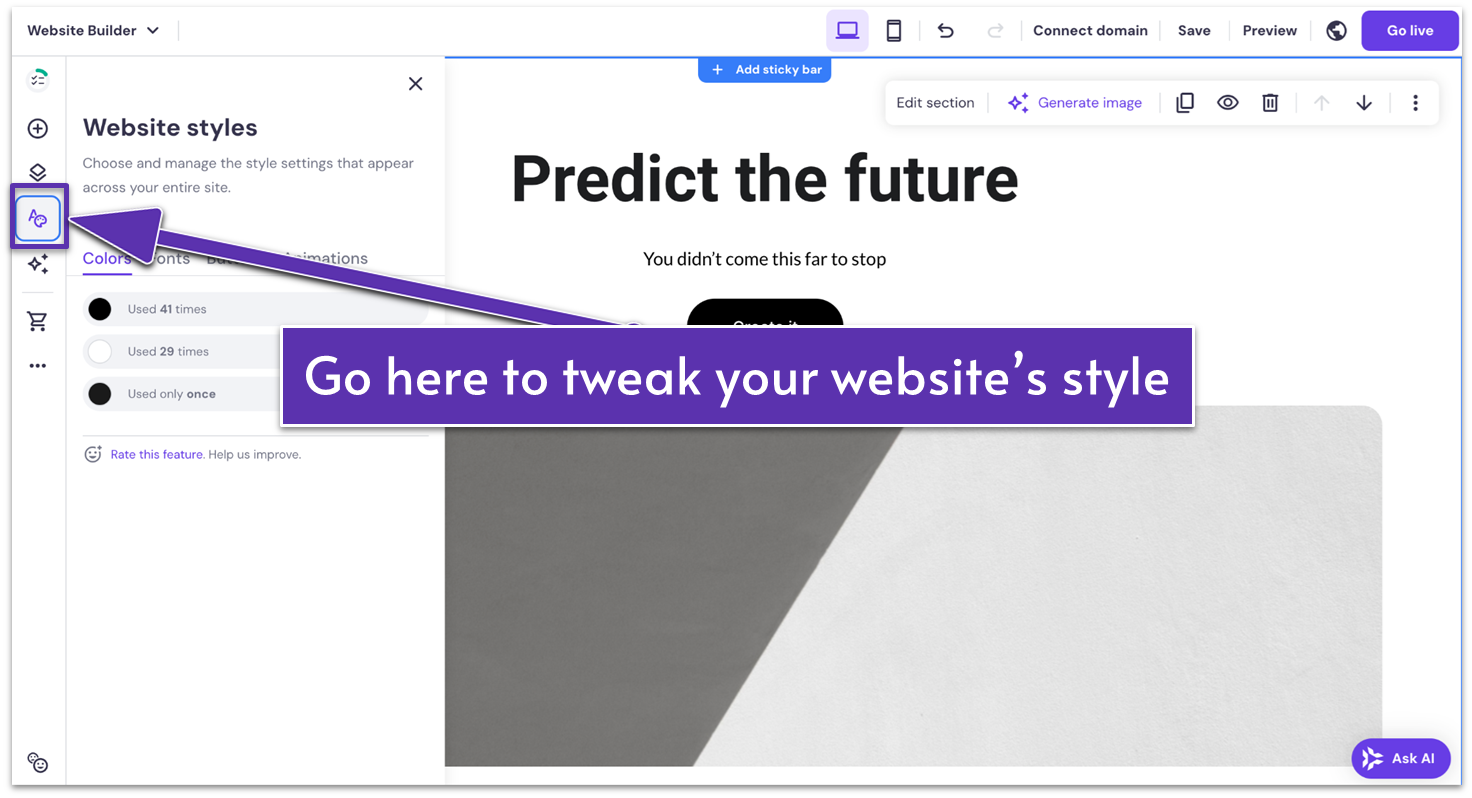
Hostinger gives you a list of the most commonly used colors to help you decide

It’s also remarkably quick and easy to customize a Hostinger template. If you want to go for a completely different look or feel, all you have to do is click on the “Website Styles” tab on the left hand menu (conveniently displayed as a paint palette). From there, you’ll be able to change the overall colors, fonts, and button styles of your site.

Hostinger Website Builder Editor
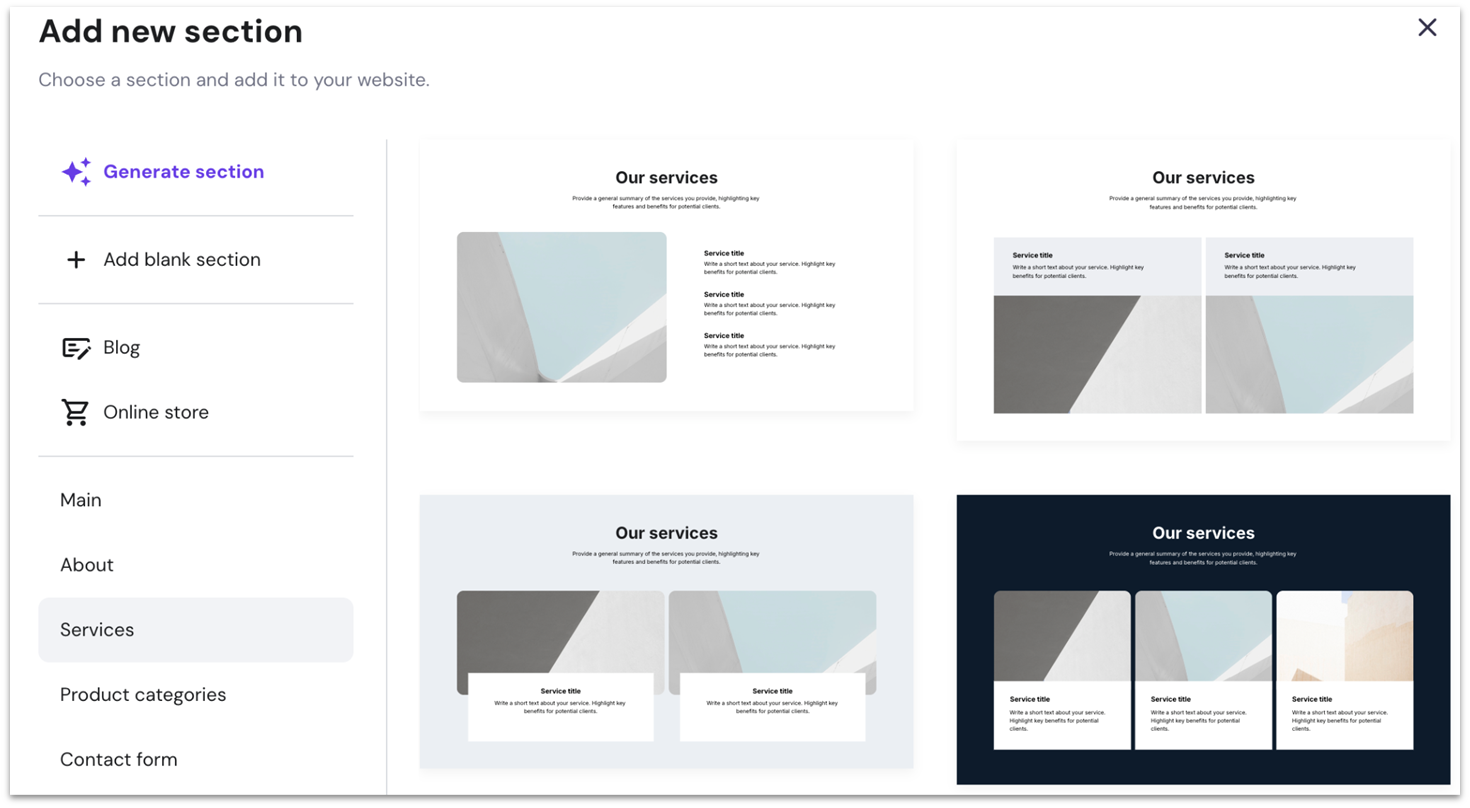
You can choose from premade sections or generate one with the help of AI

You can customize any particular element by simply clicking on it and making the changes yourself or with the help of AI tools. If there’s anything missing from the page, just click on “Add section” under an element and you’ll access a wide selection of premade sections, each made for a distinct purpose.

4.7

Features

A Well-Rounded Set of Tools

Hostinger doesn’t overwhelm you with features, but it gives you everything you need to build a solid, professional site. Its tools are versatile and easy to combine, allowing for flexible layouts and attractive designs.

You can add slideshows, shapes, and animations to elevate your site’s visual appeal. And while its integration options are limited, it includes a handful of practical marketing apps – like Facebook Pixel and Google AdSense – that can help boost your site’s reach and revenue.

That said, SEO is one area where Hostinger feels a little limited. You can still edit page titles, meta descriptions, alt text, and URLs, and it automatically generates a sitemap for search engines. But advanced features like canonical tags and built-in 301 redirect management aren’t included. If you need that level of control, you’ll have to rely on Cloudflare workarounds.

Built-In Store Inventory and Checkout Tools

Hostinger’s low-stock alerts warn you when items drop below your chosen limit, giving you time to restock. The improved Analytics page also highlights your top and bottom 10 products, with time filters to track changes. This makes it easier to double down on bestsellers and cut back on what isn’t moving.

To reduce cart abandonment, Hostinger also introduced Express Stripe Checkout, which enables Apple Pay, Google Pay, and saved cards directly on your product or checkout pages. Customers can complete purchases in just a few clicks without re-entering shipping or billing details.

Though well-rounded, Hostinger lacks advanced features like POS integration and built-in shipping that Wix and Squarespace have. However, all the essential features are there, and Hostinger is arguably easier to use, so it’s a great option for small to medium-sized online stores.

Email Marketing Tools

hostinger website builder review 20251229 1 optimage2
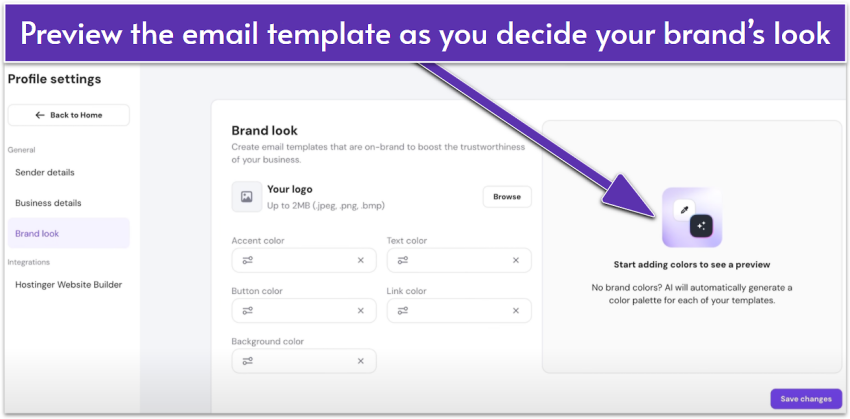
Having an email preset allows a consistent email campaign

Hostinger Reach is an AI-powered email marketing tool built into the Hostinger ecosystem. It lets you design and send branded email campaigns in minutes – even if you’ve never written a newsletter before. Just set your branding once, and it applies it across all your campaigns, so your emails look polished and consistent. You can try it for free for the first year, then upgrade later for a low monthly cost.

You also get tools to grow your email list. You can sync subscribers from your Hostinger Website Builder forms in real time, import contacts via CSV, or connect through the WordPress plugin. Once your email goes out, Reach lets you track opens, clicks, and delivery stats all from one dashboard. It also handles the technical side, like making sure your emails don’t end up in spam, adding unsubscribe links, and ensuring legal compliance.

Fully Functional Mobile Editor

Not only are Hostinger’s templates responsive, but you can also create and edit your website using just your phone. Hostinger’s mobile editor gives you access to all essential design options as well as AI features, a blog editor, and analytics tools. This means you can easily build and update your site on the go.

What’s really convenient is that you can switch between devices and work on your computer and phone without losing your edits. Hostinger has updated its mobile editor to resemble a smartphone app, but you can also access everything using your mobile browser if you prefer.

Free Automatic Website Migration

One thing I really appreciate about Hostinger is how easy it makes it to switch from another platform. If your website is built with WordPress or another open-source system, you can submit a simple request, and Hostinger’s team will take care of the migration for you – no technical headaches involved.

This hands-off process saves time and ensures a smooth transition, making it ideal for anyone who wants to avoid the usual complications of site migration. And unlike many hosts that only give you one free transfer, Hostinger offers unlimited free migrations, so you can move as many sites as you need without extra cost.

5.0

Ease of use

My Experience With Hostinger Website Builder

I found Hostinger Website Builder’s interface, feature selection, and even its approach to pricing simple. And it’s not just the front end that you can easily edit. The global site settings menu allows you to access important features such as your site’s favicon, integrations, and even usage analytics to measure your site’s performance.

Getting Started With Hostinger Website Builder

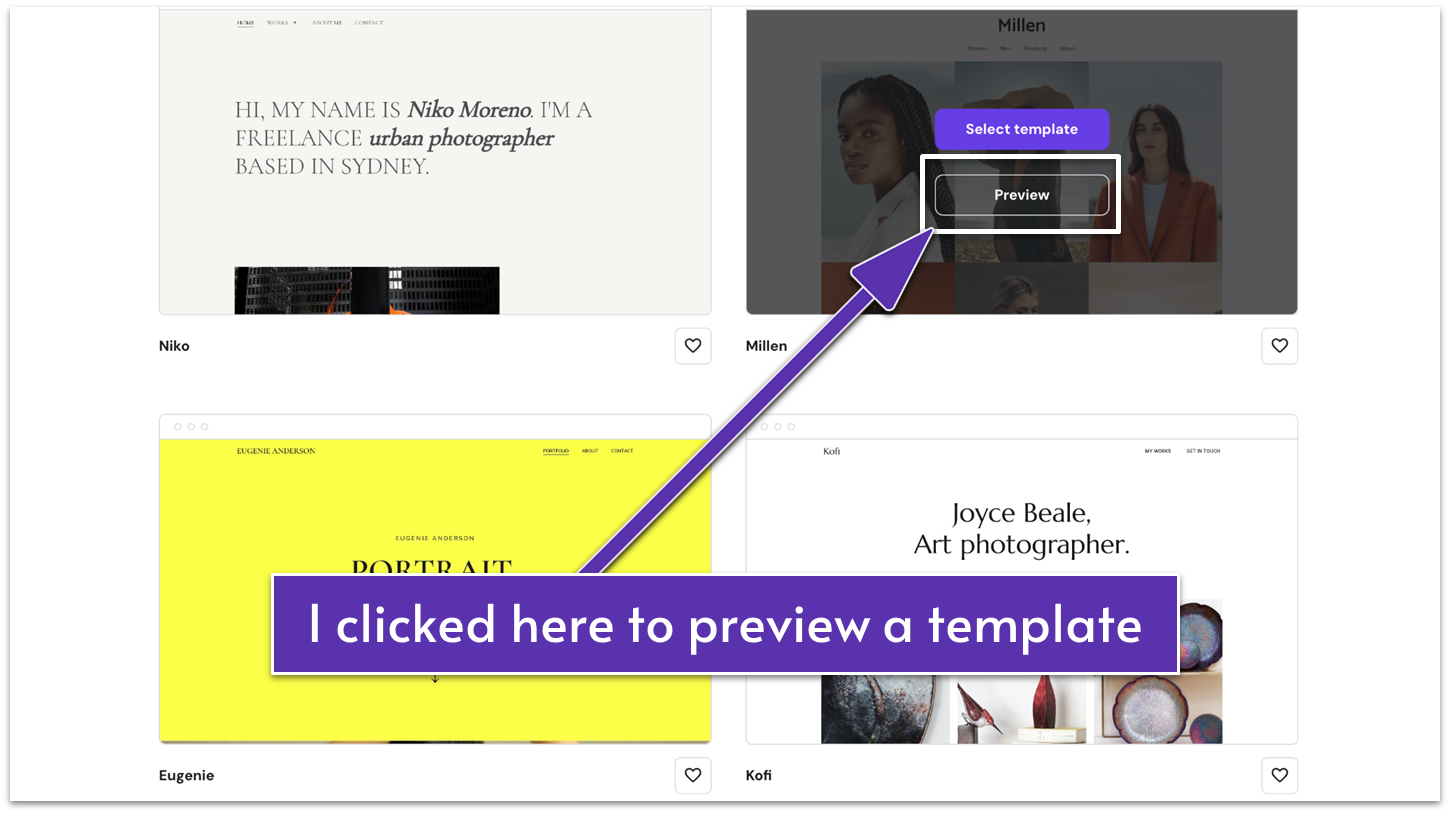
Hostinger Website Builder offers a well-organized library of templates categorized by themes such as photography, fashion, e-commerce, and blogs. Each template has a hover option that allows you to preview the design in action, which gave me a good sense of what it would look like on my own site.

Hostinger's template library
I was able to preview each template before heading into the editor

While there’s no guided template selection via a quiz or AI tool, browsing the library is still straightforward. It would be nice to see more filtering options, such as subcategories within broader themes like “wedding” or “landscape” photography, but the current setup is simple and easy to navigate.