We rank vendors based on rigorous testing and research, but also take into account your feedback and our commercial agreements with providers. This page contains affiliate links. Advertising Disclosure
Fasthosts offers a diverse range of hosting plans and services, including affordable WordPress hosting. While our previous tests revealed some problems with reliability, it seems the host has improved its offering since then. Keep reading to find out how this host ranks now in 2026.
Via its dedicated UK data centers, Fasthosts provides a number of hosting and hosting-related services to a wide range of customers – from individuals to enterprises. Its selection of shared, WordPress, VPS, cloud, dedicated, managed, and reseller hosting plans cater to various setups – from larger eCommerce stores to simpler professional websites.
Though relatively speedy and certainly affordable, the provider’s below-average uptime score has been an ongoing issue, though. However, our recent tests show that Fasthosts has successfully improved both its loading speeds and uptime. Now, I can safely say that Fasthosts WordPress hosting plans are worthwhile contenders – specifically if your customer base is located in the UK, as its data centers are in Gloucester.
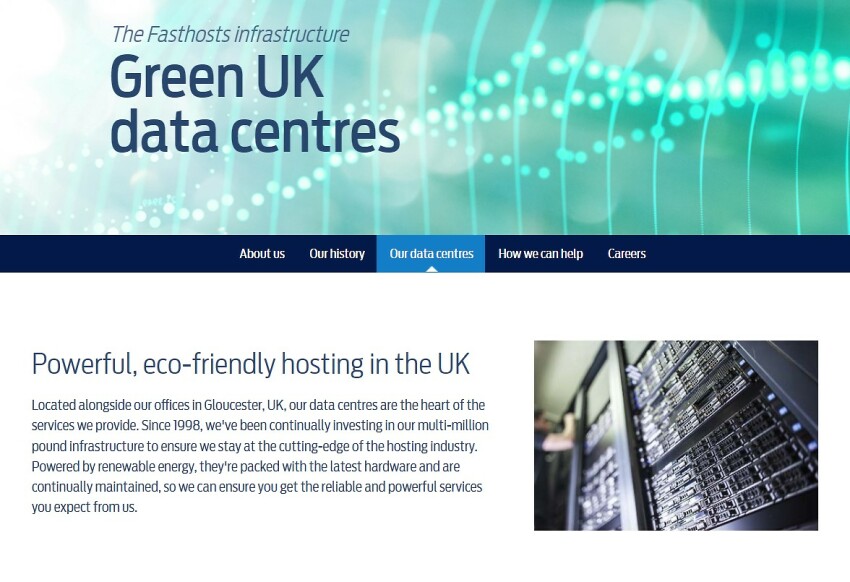
Otherwise, Fasthosts is reasonably-priced, if not the best “value-for-money” solution. That said, if you’re looking for an eco-friendly host, it may be it – Fasthosts data centers run 100% off renewable energy.
However, if your target market is another locale – such as North or South America, Asia, or Oceania – I recommend Hostinger instead. With Hostinger’s WordPress hosting plans and other hosting types, you can select from servers in the USA, Singapore, India, and Brazil.
4.2
Features
The Basic WordPress Features You Need – But With Some Notable Limitations
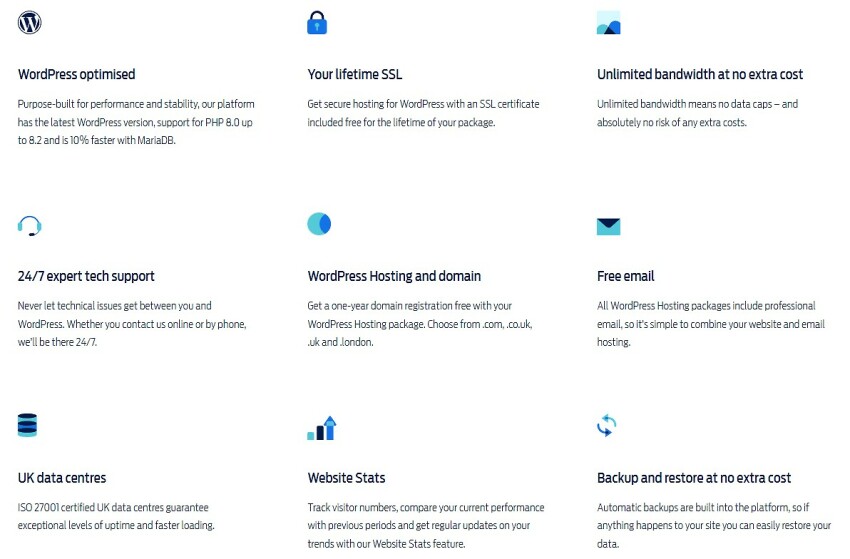
Automatic backups, 24/7 support, WordPress installation, SSL certificates, and more are included with Fasthosts WordPress hosting
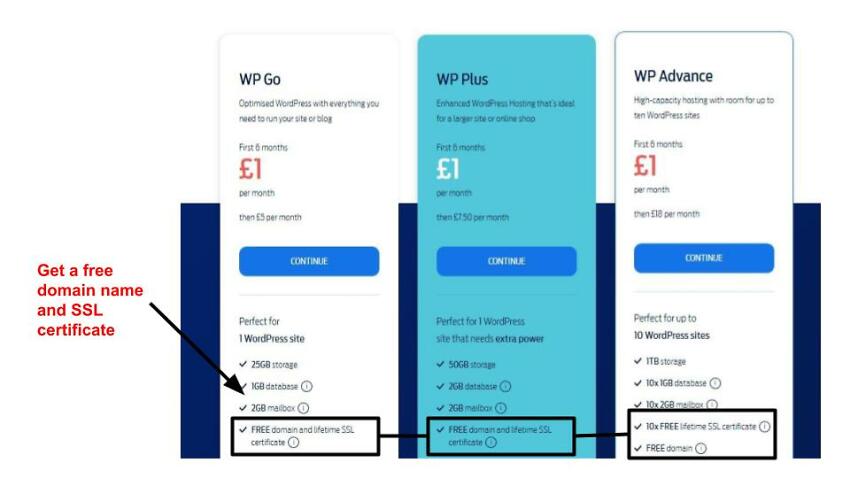
A number of useful features are included with Fasthosts shared and WordPress hosting plans. A WordPress auto-installer, free domain name registration, SSL certificates, and 24/7 support come standard, for example. Unlimited bandwidth and SSD storage on all Fasthosts plans – including dedicated and VPS options – are another bonus.
The issue comes in when you compare each Fasthosts plan’s limitations regarding the number of sites you can host and storage space. For example, on Fasthosts’ most expensive WordPress plan – WP Advance – you can only host up to ten sites – and its two other plans offer somewhat scant amounts of storage space (25 or 50 GB).
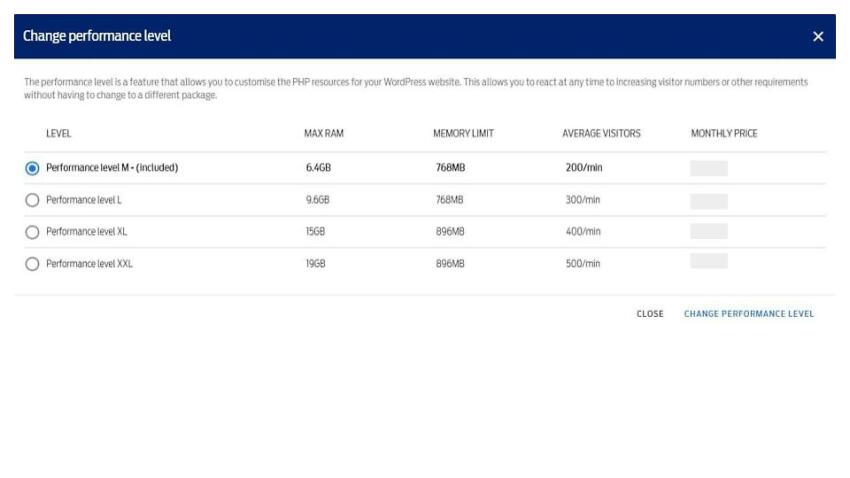
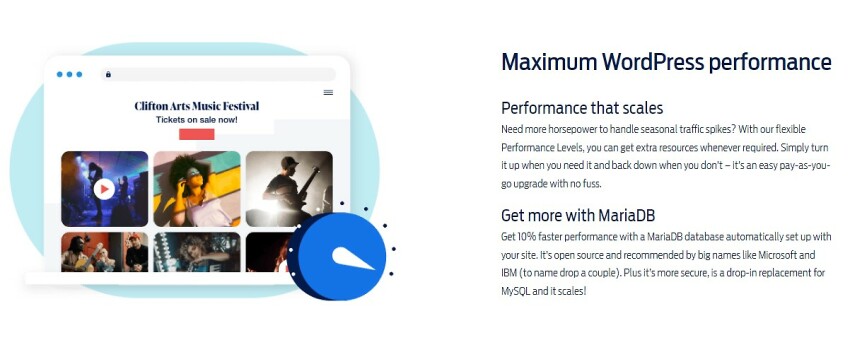
You can upgrade your Fasthosts plan performance limits – for a fee
WordPress Auto-Installer
Fasthosts’ WordPress auto-installer makes setup easy for beginners or those with limited technical knowledge. You are asked simple questions while being guided through the process.
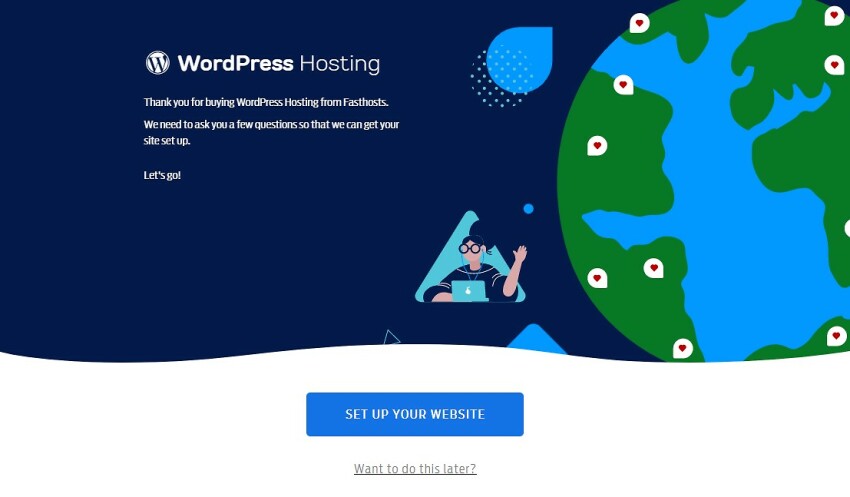
Answering a few questions can help you set up your Fasthosts website in minutes
During the sign-up process, you’ll be prompted to answer a few questions about your WordPress site’s intended usage and type – which will help Fasthosts better optimize it for you. You can also skip this entire process if you’re migrating your site from another host or planning to create your site later on. Either way, the WordPress website setup process with Fasthosts is very user-friendly.
Another plus of getting hosted by Fasthosts is the free domain name (or names) included with your WordPress plan. Many hosts don’t offer one for free with hosting, requiring you to pay for a domain name separately, sometimes even via a different provider.
Some Fasthosts plans include multiple free SSL certificates and domain names
With shared Fasthosts web hosting packages, you can get as many as 5 free domain names and SSL certificates free. The Fasthosts WordPress Advance plan comes with up to 10 SSL certificates, but only a single free domain name.
The offer applies only to .com, .uk, .co.uk, and .online addresses, with other domain names purchasable for an extra fee. All Fasthosts SSL certificates also use ultra-secure 256-bit TLS encryption.
Do note that Fasthosts VPS and cloud plans don’t include SSLs and domain names for free, offering them instead as optional paid add-ons, although this is typical for higher-end plans.
MariaDB
Fasthosts-hosted WordPress site’s are built on the faster MariaDB database platform
With Fasthosts WordPress hosting plans, MariaDB databases come standard, as a database is required for every WordPress website. MariaDB is a free, open-source system similar to and compatible with MySQL. Designed by the founders of MySQL, it’s a branch of it – but it will allow your WordPress sites to run a little faster.
Useful Paid Add-Ons
There’s more to a website than a template, domain name, and hosting. Cybersecurity, marketing, email hosting, and SEO optimization are just a handful of other important considerations. Fasthosts assists with additional software and tools to excel in all these vital areas.
When hosting with Fasthosts, you’re supported with a variety of paid add-ons:
Marketing tools: listing, ads, and SEO managers, as well as tips and insights
Advanced cybersecurity software from Acronis Cyber Protect
Premium in-house basic and e-commerce website builders
Email and Microsoft Exchange hosting
Microsoft Office Suite products
Plesk Obsidian control panel
Additional IPv6 and IPv4 addresses
Fasthosts Features at a Glance
Free domain name?
✔
Free SSL?
✔
Money-back guarantee
30-day money-back guarantee
Uptime guarantee
99.9%-99.999%
Managed hosting features?
✔
Number/Location of data centers
Multiple in the UK, USA, Germany, and Spain.
4.7
Ease of use
Optimized & User-Friendly for Beginners, But Could Include More Freebies
Fasthosts control panel and WordPress admin page make website management easy
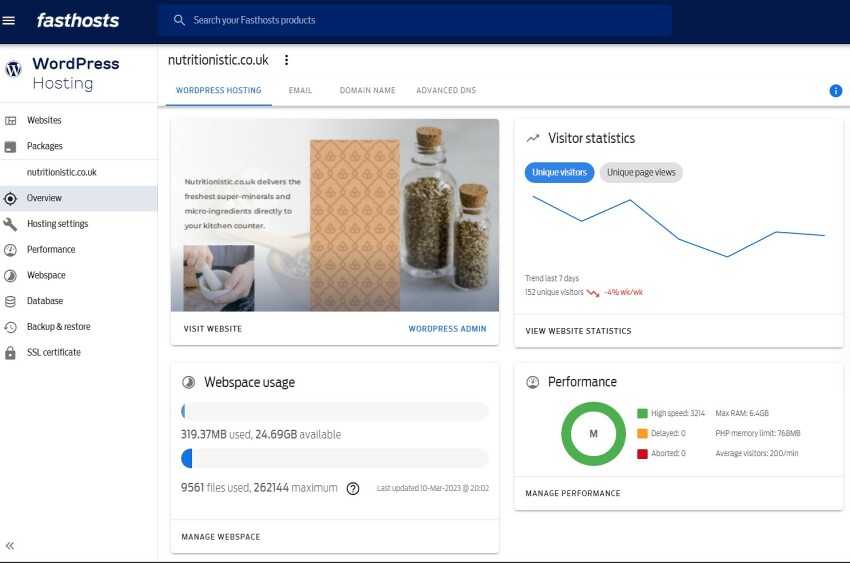
Setting up and managing website hosting with Fasthosts is very easy, as both its sign-up process and control panel are very user-friendly. You can complete a number of website hosting management tasks from the Fasthosts admin panel – as well as access statistics and buy paid add-ons. Overall, pleasing to the eye and straightforward enough for beginners.
In our tests, we were also able to jump directly to our site’s official WordPress Dashboard from the Fasthosts admin panel without logging in separately.
Creating a New Account With Fasthosts
When you opt-in to purchase a Fasthosts WordPress hosting plan or another paid service, an account creation page automatically loads. However, you can also create an account without buying a product via the Create account link under the Log In drop-down menu.
You can sign up for optional marketing tools when you purchase Fasthosts hosting
We were prompted to add Marketing Radar to our Fasthosts WP Go hosting plan – we simply opted out by clicking Continue Without Marketing Radar.
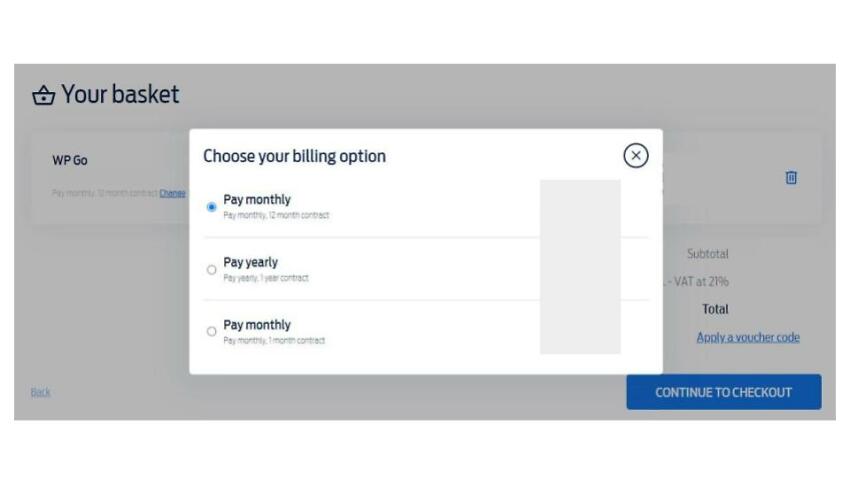
Plus, when finalizing your order, you can select from monthly or yearly payment terms on or off contract to save money. However, you’ll need to click Change under the plan name on the Your Basket page to do so. Pay close attention to the terms on the plan you choose, as the claimed discounts can be misleading.
For example, Fasthosts’ seemingly most-discounted WordPress hosting plan – Pay monthly, 12-month contract – actually ends up more expensive than its truly best-value Pay yearly option. This is due to the fact that though the first 6 months of the monthly 1-year contract are heavily discounted, the following 6 are charged at full price.
Discounts are accessible by opting for a longer Fasthosts hosting term or contract
Connecting a Domain and Installing WordPress
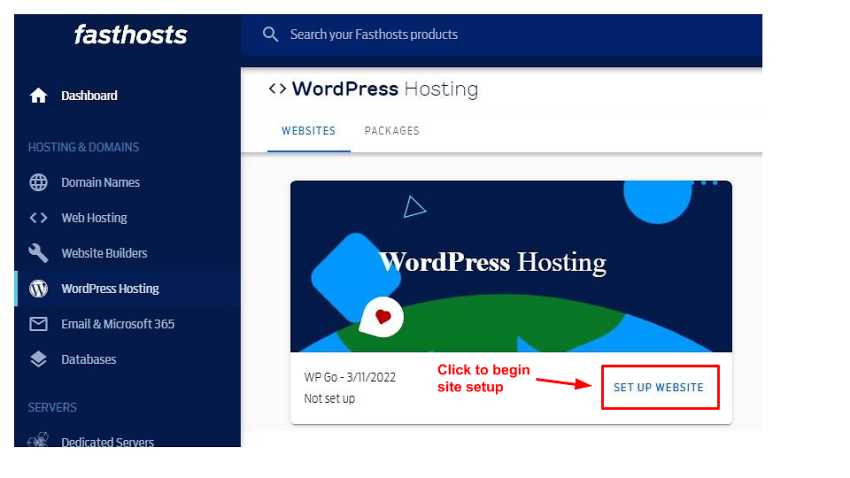
Fasthosts’ WordPress hosting plan is streamlined to get your hosting account and actual website(s) up as quickly as possible. Once you’ve logged into the Fasthosts WordPress Hosting dashboard, click on SET UP WEBSITE under the WordPress Hosting tab to begin the process and connect your domain. Doing so will launch the WordPress instant installer.
You can create your WordPress website with no technical knowledge using the instant installer
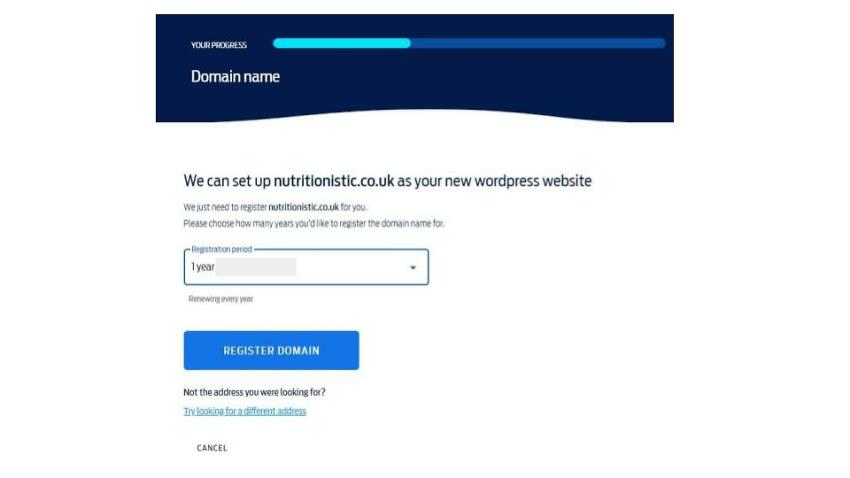
During the Fasthosts WordPress website creation process, we were prompted to add or register our domain name. You can select your domain name registration period here. You can also select a domain name separately via the Domain Names link in the left-hand menu if need be. You’ll just need it registered and on hand during the site creation process.
With Fasthosts WordPress plans, only one free domain name is included for 1 year, which must be a .com, .uk, .co.uk, or .online address. Other domain names are available for purchase separately during the site setup process.
With Fasthosts, variable domain registration terms are available
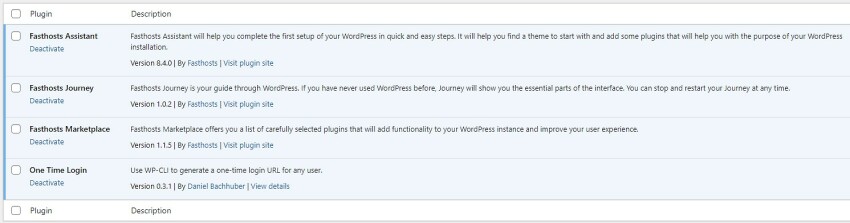
In our WordPress website’s admin dashboard, we noticed some helpful pre-installed Fasthosts WordPress plugins. I like how easy it is to get a website’s design ready using Fasthosts’ Assistant plugin. It provides selected themes and plugins based on your website’s purpose. The Fasthosts Journey tool guides you through using and optimizing your WordPress website thereafter.
You can take advantage of all the useful Fasthosts WP tools and guides
In the Fasthosts Marketplace, you can find a number of curated plugins best suited for WordPress sites. Of course, all of these tools are optional to use. So, if you’re a pro at setting up a WordPress site or want to do so manually, you can still do so. Another plus? Fasthosts also helps you generate a passwordless WP-CLI login URL using the One Time Login plugin.
Easy WordPress Site Login
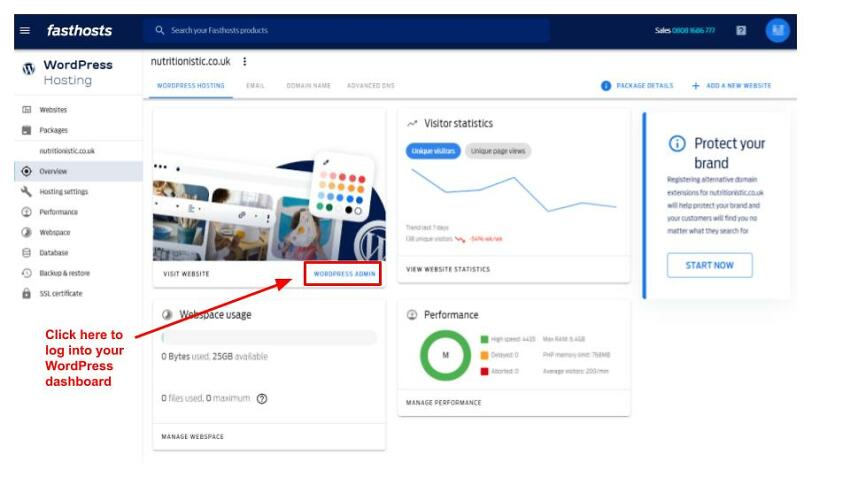
If you struggle to remember your password or hate logging in to admin panels over and over again, Fasthosts has you covered. Its instant WordPress login takes you directly to your site’s official WordPress Dashboard. Here, you can edit your site via the WordPress website editor or a connected third-party plugin and complete other vital website management tasks such as publishing site content.
The “WordPress Admin” button helps you instantly log in to your WP site
Dedicated Fasthosts WordPress Hosting Admin Panel
If you choose a Fasthosts WordPress hosting package, you also have access to a dedicated Fasthosts WordPress hosting panel. It’s integrated into the general Fasthosts control panel, being accessible via the left-hand menu under WordPress Hosting.
 Website Planet